

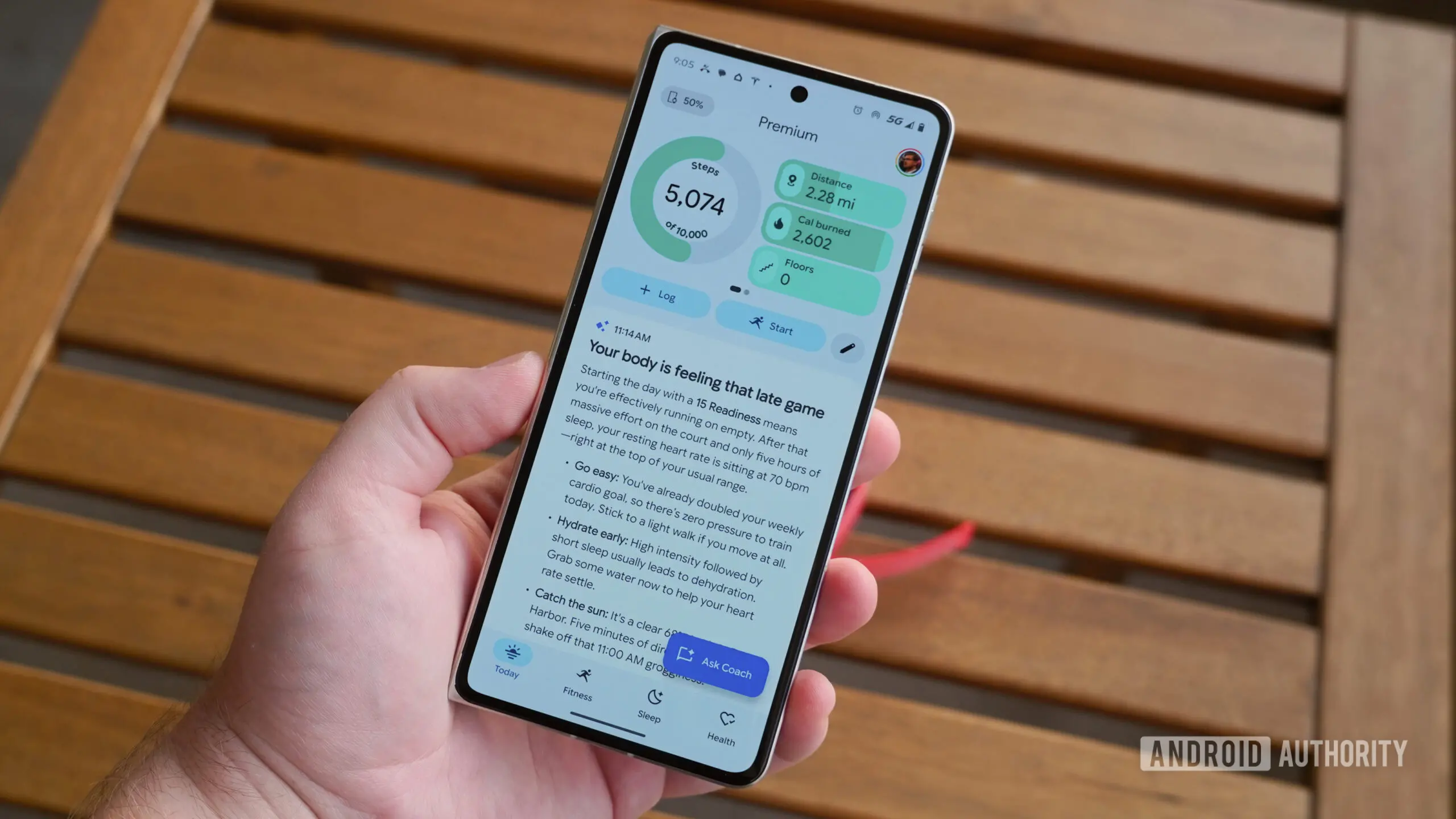
Ever since Google overhauled its health ecosystem with its AI-powered Health Coach, many users have felt that using the new Google Health app is a frustrating experience. Instead of clean, easily scannable fitness metrics, users were suddenly greeted by paragraphs of unprompted AI commentary every time they opened the app. Fortunately, Google seems to be acknowledging the pushback. New strings discovered in the Google Health app v5.04.1 reveal that the company is preparing dedicated preference controls that will finally let users mute AI Coach insights and return to viewing their raw data.
The Rise of AI Commentary in Health Tracking
AI-powered health coaching was supposed to be the next big step in fitness tracking. By analyzing step counts, heart rate variability, sleep patterns, and activity trends, a smart assistant could offer personalized advice and motivational nudges. Google, which has spent years integrating its services with Fitbit and other wearable devices, saw an opportunity to make the Google Health app more than just a data dashboard. The result was the AI Coach, a conversational layer that translates raw metrics into plain-language summaries and recommendations.
For some users, this feature was genuinely useful. It can call out inconsistencies in sleep schedules, suggest recovery days after intense workouts, or highlight changes in resting heart rate that might warrant attention. But for many others, the implementation felt overwhelming. Instead of opening the app to check daily step counts or recent workout splits, users had to scroll past lengthy blocks of AI-generated text. The commentary often repeated information that was already visible in charts and graphs, and it appeared even when users had not asked for any analysis.
Frustrations over the feature have been mounting for weeks across community platforms. Users on Reddit and the official Google Support forum have complained about long walls of text cluttering their dashboards, calling the AI advice intrusive and unnecessary. Some described the app as feeling less like a health tracker and more like a chatbot that would not stop talking. Others noted that the AI Coach commentary made it harder to quickly glance at metrics during a busy day, defeating the purpose of having a sleek mobile dashboard.
The Complaints: Downvotes and Ignored Requests
What made the situation worse is that users had little control over the AI Coach’s behavior. Initially, there appeared to be feedback mechanisms built into the feature. Users could downvote specific recommendations or send a thumbs-down reaction to a particular AI message. Some users even typed responses telling the coach to stop providing commentary. Yet, as reports piled up, it became clear that these actions did not change the AI’s output. The coach would continue generating the same style of commentary, with the same level of verbosity, regardless of negative feedback.
Users also pointed out that downvoting recommendations or asking the AI to stop didn’t alter its behavior, leaving them stranded with unrequested essays when all they wanted was to check basic stats. For many, forced AI commentary made Google’s health subscription feel like a downgrade. People who had paid for premium health tracking features were frustrated that they could not opt out of a feature that seemed to be designed for a different audience. The lack of preferences was seen as a misstep, especially for a company that usually emphasizes user control and customization.
Google’s health subscription model already has a complicated relationship with its user base. Some users appreciate the comprehensive analytics and personalized insights, while others prefer a more traditional fitness tracker that simply records workouts and shows progress over time. The AI Coach was meant to bridge that gap, but instead it alienated a significant portion of the user base. The outcry reached a point where community moderators and support staff were repeatedly directing users to provide feedback, though many felt that their feedback was not being taken seriously.
What the Code Reveals: A New Coaching Preferences Section
To address these complaints, Google is preparing to introduce a new “Coaching” preferences section within the Google Health app’s settings menu. According to the discovered strings, this section will allow users to customize their coaching experience. The strings are part of the app’s v5.04.1 update, which is currently being tested. A code-level teardown of the app reveals that Google has added new labels and descriptions for a menu that will likely appear under the app’s settings or profile section.
The first string appears to be the title of the new section: “Coaching.” A second string explains that changes made in this menu will apply to future messages, not to messages that have already been generated and received. This is an important detail. Users who immediately switch off AI Coach insights should not expect their existing chat history to disappear. Instead, the setting will act as a filter for new content going forward. Once enabled, the AI Coach will stop sending new commentary, and the app will instead show basic updates without any coach-generated text.
The full set of discovered strings includes:<string name="coaching_preferences_title">Coaching</string>
<string name="coaching_preferences_info_description">Changes will apply to future messages. Updating these settings won’t delete previous messages and insights.</string>
<string name="coaching_preference_standard_title">Standard</string>
<string name="coaching_preference_standard_description">Full messages from Coach</string>
<string name="coaching_preference_off_title">No Coach insights</string>
<string name="coaching_preference_off_description">Basic updates, without commentary from Coach</string>
The choices are straightforward. A “Standard” option will preserve the current behavior, showing full messages from the AI Coach. A “No Coach insights” option will disable those messages entirely, leaving users with basic fitness updates and raw data. The second option is clearly designed to address the most common complaints. It strips away the conversational AI summaries and returns the app to a more traditional dashboard layout.
How the Toggle Will Work in Practice
Based on the strings, the “Coaching” preferences section will likely contain a simple selection between the two modes. This is not a binary on/off switch for the entire health coaching feature, but rather a choice between two distinct presentation styles. Users who enjoy the AI Coach commentary can leave the setting at Standard and continue receiving full messages. Users who find the commentary redundant can switch to No Coach insights and see only basic metrics, such as steps, distances, calories, and workout summaries.
There is also a note in the strings that “changes will apply to future messages.” This means the AI Coach will not retroactively remove any insights that have already been delivered. If a user has a long history of AI-generated tips and recommendations, those messages will remain in the app until manually deleted or cleared. However, once the setting is changed, new AI commentary will no longer appear. This is a practical approach, as it avoids altering the user’s existing data and conversation history.
It is worth noting that this preference is separate from other health app settings, such as notification preferences or data sharing controls. Users will still be able to receive health-related notifications, but the content of those notifications may change depending on the selected coaching mode. The “No Coach insights” option is designed to minimize text, so it is likely that users who choose this mode will only see basic alerts, such as “You have achieved your step goal” or “Your sleep data has been updated.”
Why This Matters for the Future of AI in Health Apps
The introduction of coaching preferences is more than just a small UI tweak. It signals a broader shift in how health apps approach AI integration. Many companies have rushed to add AI assistants, chatbots, and generated insights to their products, sometimes without considering that not all users want a conversational layer. The backlash against Google’s AI Coach is a valuable lesson: personalization does not mean forcing everyone into the same AI-driven experience.
Google has always positioned itself as a leader in user-friendly design, and the original roll-out of the AI Coach appears to have clashed with that philosophy. By adding a dedicated preferences section, Google is acknowledging that different users have different needs. Some want detailed, AI-generated explanations of their health data. Others want a simple, at-a-glance dashboard without any commentary. Both are valid ways to interact with a health app, and providing users with a choice is the right approach.
This move could also have implications for Fitbit and other devices that integrate with Google Health. If users are given more control over how AI insights are displayed across the ecosystem, it may encourage deeper engagement with health tracking. People who previously felt annoyed by the AI Coach might start using the app more regularly once they know they can silence it. The change could reduce churn and improve user satisfaction without requiring Google to abandon its AI ambitions.
The Changing Landscape of Health Tracking
Health tracking has become an essential part of daily life for millions of people. Smartwatches and fitness bands collect a dizzying amount of data, from step counts to blood oxygen saturation to sleep stages. The challenge for app developers is not collecting data, but presenting it in a way that is both informative and unobtrusive. Over the past few years, the trend has been toward more proactive health monitoring, with apps surfacing anomalies and suggesting actions. AI is a natural fit for this trend, but it must be implemented carefully.
Google Health is not the only app to face criticism for overly aggressive AI features. Other fitness and wellness platforms have also experimented with AI-generated commentary, and some have faced similar complaints. The key difference is that Google has the resources and the user base to gather extensive feedback and iterate quickly. The upcoming coaching preferences are a sign that the company is listening and adapting, rather than forcing a one-size-fits-all experience.
Users who have been waiting for a cleaner interface will likely welcome this change. The option to disable AI Coach insights will make the app feel more like the original Google Health interface, which was praised for its clean design and straightforward metrics. It also helps that the setting is presented as a simple choice between two modes, rather than buried in a complex submenu. The strings suggest that the preferences are clearly labeled and easy to understand, with descriptions that explain exactly what each option does.
While Google has not officially announced when these options will go live for everyone, their inclusion in the app code suggests a cleaner, less talkative health interface is right around the corner. The company typically rolls out such features through a staged server-side update, which means the preference menu could appear for some users before others. It is also possible that the feature will be showcased during a future app update announcement or in the Google Health community forums. As with all teardowns, there is no guarantee that the feature will reach a public release, but the code is a strong indicator of Google’s intentions.
For now, users who are tired of reading AI-generated essays every time they check their step count can look forward to a more streamlined experience. The ability to switch to “No Coach insights” restores the core function of a health tracker: making your data easy to see and understand. The AI Coach may eventually evolve into a more helpful and less intrusive assistant, but the immediate priority is giving users control. The new preference options, if released, will be a welcome step in that direction.
We’ll keep you updated when we learn more.
Source: Android Authority News