

We find the most joy using our smartphones as social media machines, but our phones also handle mundane activities like communication and navigation. If you're on Android, you most likely default to Google Maps to plan your commutes and explore new places. While Apple Maps' many useful features make it a compelling alternative, Google Maps enjoys a huge user base, likely because it has had a head start of more than a decade in mapping out even the most rural corners of the world.
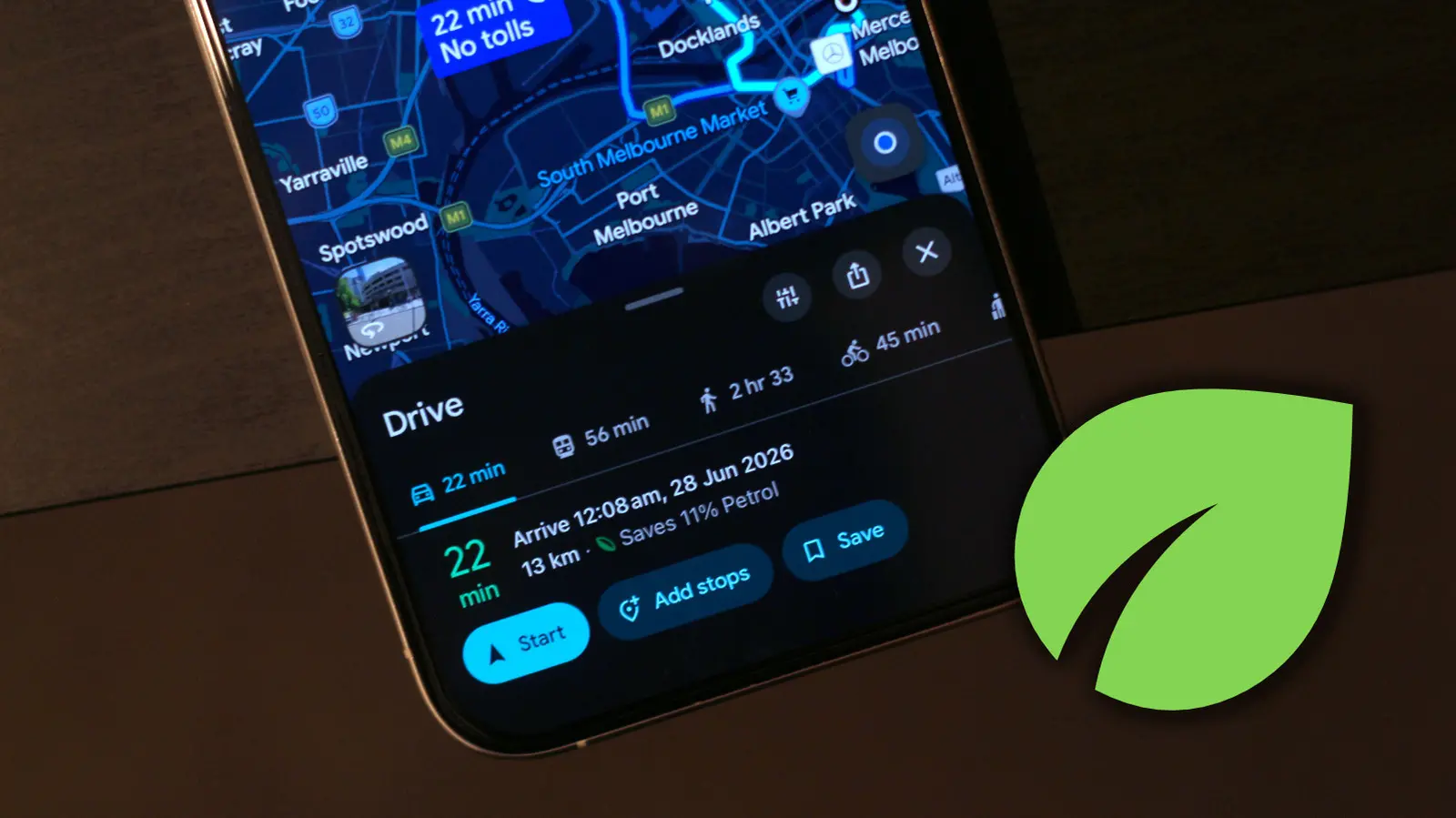
For those of us who aren't passionate navigators, Google Maps offers a clean user interface with easy-to-understand controls. That said, there are several quality-of-life Google Maps features that are easy to miss. These are often hidden within menus or denoted by icons you might not have given much thought about. The green leaf symbol is one such example that shows up when you start picking a route to a destination. It essentially indicates that the route is the most eco-friendly option.
You can view more info about the eco-friendly route if you expand the navigation details from below. Google Maps will display how much gas you'll be saving by picking this route and, if applicable, how much longer your trip will take compared to the fastest route. Google claims it determines which route is the most eco-friendly by taking into consideration factors such as real-time traffic and road conditions.
Customizing Google Maps just for you
Relying on eco-friendly routes is an effective way to save fuel in your car. You can customize your Google Maps experience to let it automatically select eco-friendly routes whenever available. To do this, open Google Maps, tap on your profile picture, head to Settings > Navigation, and turn the “Prefer fuel-efficient routes” toggle on. From now on, assuming your destination has more than one route, Google Maps will automatically put you on the one that saves the most gas.
Now is also a good time to enter more details about the vehicle you're driving, since, by default, Google Maps calculates routes assuming you have a gas or petrol-powered car. Navigate to Settings > Your Vehicles and select an engine type. Options include petrol, diesel, hybrid, and electric. This is important because Google Maps estimates eco-friendly routes based on your vehicle's engine type. You can also select a different avatar for your car and motorcycle. This replaces the default blue navigation arrow that shows where you are on the map.
How Google Maps Calculates Eco-Friendly Routes
Google Maps uses a sophisticated algorithm that combines data from various sources to determine which route is most fuel-efficient. The system was introduced in 2021 after Google partnered with the U.S. Department of Energy’s National Renewable Energy Laboratory (NREL) to model fuel and energy consumption for different vehicle types. The algorithm factors in real-time traffic conditions, road gradients (hills and slopes), and the type of engine you have selected. For example, a hybrid vehicle benefits more from stop-and-go traffic because it can capture regenerative braking energy, while a diesel engine might be more efficient on highways. Google also takes into account the average speed on a given road and the number of intersections or stops, as acceleration and deceleration impact fuel consumption.
The leaf symbol appears only when an eco-friendly route differs from the fastest route. If the fastest route is also the most fuel-efficient, Google Maps does not show a separate leaf-labeled route. The company claims that choosing eco-friendly routes can save anywhere from a few percent to over 20% in fuel consumption depending on conditions. Over time, this adds up to significant savings and reduced carbon emissions. The feature is available in dozens of countries, and Google continues to expand the coverage.
Historical Context and Development
Google Maps first launched in 2005 as a web-based mapping service, quickly becoming the dominant navigation tool for millions. Over the years, it has added layers for traffic, public transit, biking, and walking. The eco-friendly routing feature represents a major step toward sustainability, aligning with Google’s broader goal of becoming carbon-free by 2030. In 2020, Google announced that it had removed all historical carbon emissions from its entire lifetime, and the company invests heavily in energy-efficient data centers. The leaf symbol is part of a suite of eco-friendly features, including the ability to compare carbon footprints of different travel modes (driving vs. public transit vs. walking) in some cities.
It is worth noting that the eco-friendly route is not always the shortest distance. Sometimes taking a slightly longer route with fewer hills or less traffic can save more fuel. Google’s algorithm weighs multiple variables to find the optimal balance. Users often see the leaf symbol when planning longer trips, such as intercity drives, where the difference between fastest and eco-friendly can be a few extra minutes but substantial fuel savings.
Additional Hidden Features in Google Maps
Beyond the leaf symbol, Google Maps is packed with other hidden gems that enhance navigation and convenience. One is the ability to save parking locations: after you park, you can drop a pin or tap the blue dot to mark “You parked here.” Another is the “Speed Limits” and “Speed Cameras” alerts, which are available in many regions and help you avoid speeding tickets. Users can also share real-time location with friends and family for a set duration, making meetups easier. For those who travel frequently, offline map downloads are essential: you can select an area and download it to your phone so that even without cellular data, you can navigate and search for places.
Google Maps also integrates with other Google services. For instance, if you have a Google Calendar event with an address, Maps can automatically suggest the route at the event time. The “Explore” tab allows you to discover nearby restaurants, bars, and attractions with ratings and reviews. For public transit users, Maps provides live departure times and service alerts in many cities. All these features make the app indispensable for daily life.
Tips for Maximizing Fuel Efficiency with Google Maps
To get the most out of the eco-friendly routing feature, consider these tips. First, always ensure your vehicle type is set correctly in the app. If you drive a plug-in hybrid but have it set as a conventional petrol car, the calculated savings will be off. Second, combine eco-routing with other best practices: maintain a steady speed, avoid hard acceleration and braking, and keep your tires properly inflated. Even with the most efficient route, your driving behavior affects real-world fuel economy. Third, check the “Avoid toll roads” and “Avoid highways” options if they align with your preferences, as toll roads sometimes have smoother traffic flow but may not be the eco-friendliest due to higher speeds.
For electric vehicle (EV) drivers, Google Maps has additional features. In 2022, Google added EV-specific routing that includes charging stops. When you select an EV as your vehicle type, the app will suggest routes that include charging stations compatible with your car’s connector type and preferred charging networks. It also estimates how long you’ll need to charge and adjusts arrival time accordingly. The leaf symbol for EVs indicates the route that uses the least energy, which is especially important to maximize range on long trips. Google also partnered with companies like ChargePoint and Electrify America to provide real-time availability of charging stations.
Comparison with Apple Maps and Other Navigation Apps
Apple Maps introduced its own eco-friendly routing feature in iOS 14, also using a green leaf icon. Both services draw from similar data sources, but Google Maps holds an advantage due to its vast user-generated data and years of traffic history. Apple Maps focuses on privacy and on-device processing, while Google leverages cloud computing for more dynamic updates. In side-by-side tests, the difference in suggested eco-friendly routes is usually minor. However, Google Maps offers more granular control over vehicle type, including diesel and hybrids, whereas Apple Maps only recently added EV support. For those who want the most fuel-efficient driving, Google’s additional settings give it a slight edge.
Other navigation apps like Waze (owned by Google) also offer a fuel-saving mode, but Waze prioritizes user-reported data like speed traps and police presence, and its route optimization is more focused on avoiding traffic than maximizing efficiency. MapQuest and HERE WeGo have their own versions, but they lack the real-time traffic integration and vehicle-specific modeling that Google Maps provides. Overall, the leaf symbol in Google Maps is a valuable tool for environmentally conscious drivers who want to reduce their carbon footprint and save money at the pump.
Future of Eco-Friendly Navigation
As electric vehicles become more common, navigation apps will likely evolve to include more granular energy consumption data. Google has already started integrating with vehicle manufacturers to receive real-time battery status and energy usage. Future updates might allow the app to recommend departure times to avoid peak traffic or to charge during off-peak hours for cheaper electricity. Additionally, Google could expand the leaf symbol concept to other modes of transport, such as cycling (where it might prioritize flat routes over shortest distance) or public transit (where it could suggest lines with lower emissions per passenger). The company is also experimenting with AI-powered navigation that learns from your driving patterns to suggest personalized eco-routes.
For now, the leaf symbol remains a simple yet powerful indicator. It reminds us that small decisions in our daily commute can collectively make a big difference. By enabling the “Prefer fuel-efficient routes” setting and entering your vehicle type, you can let Google Maps do the thinking for you. Try it on your next trip and see how much you can save—both your wallet and the planet will thank you.
Finally, it is important to note that the leaf symbol is not a guarantee of maximum fuel savings in all conditions. Factors like sudden road closures, weather, and your own driving style can affect actual consumption. Nevertheless, it serves as a helpful guide for making greener choices, and over thousands of miles, the cumulative impact is significant. Whether you are a daily commuter or an occasional road-tripper, taking advantage of this feature is a straightforward step toward more sustainable travel.
Source: SlashGear News